LightBlog

mardi 2 mars 2021

Latest OxygenOS Open Beta brings Always-On Display feature to OnePlus 7 and OnePlus 7T, but you should avoid it

OnePlus users have long lobbied for the Always-On Display feature to be included in OxygenOS. The company finally budged and promised to bring the feature to OnePlus phones with the OxygenOS 11 update. Making good on its promise, the company brought the Always-On ambient display functionality on the OnePlus 7 Pro and the OnePlus 7T Pro in OxygenOS 11 Open Beta 2 last month. To the surprise of many OnePlus 7 and OnePlus 7T users, however, the feature wasn’t made available for their device — however, it was still possible to enable it.  But that changes now as OnePlus is preparing to bring the AOD mode for both phones.

The changelog for the latest OxygenOS 11 Open Beta 3 for the OnePlus 7T mentions that Always-On Display will be made available for the OnePlus 7 and 7T in a future update. As spotted by PiunikaWeb, however, the feature is actually included in the Open Beta 3 update for the OnePlus 7 and 7T — it’s just that the official changelog on the OnePlus’ website fails to reflect this.

If you own either a OnePlus 7 or OnePlus 7T running OxygenOS 11 Open Beta 3, you can access the Always-On Display under Settings > Utilities > OnePlus Laboratory > Always-On ambient display. As reported by many users, however, it’s quite buggy at the moment. For some, it straight up doesn’t work at all. OnePlus warns that enabling AOD will lead to increased power draw in its current implementation but says it would work on optimizing the feature in the upcoming updates.

OnePlus 7 XDA Forums || OnePlus 7T XDA Forums

As already mentioned, Always-On Display is currently only available to OnePlus 7 and OnePlus 7T running the latest Open Beta release. If you don’t want to go through the hassle of wiping data and joining the Open Beta program, it’s best to wait for the stable update as it will most probably be included in the final release of OxygenOS 11 based on Android 11.

The post Latest OxygenOS Open Beta brings Always-On Display feature to OnePlus 7 and OnePlus 7T, but you should avoid it appeared first on xda-developers.


from xda-developers https://ift.tt/3uGEmod
via IFTTT

Download: Xiaomi Mi 10T Lite and Redmi K20 get their first Android 11-based MIUI 12 builds

After rolling out Android 11-based MIUI 12 updates to a slew of Mi and Redmi phones last month, Xiaomi is back again with fresh MIUI 12 builds for the Redmi K20 / Mi 9T (davinci) and Mi 10T Lite / Redmi Note 9 Pro 5G [China] / Mi 10i [India] (gauguin).

The Redmi K20 / Mi 9T is receiving the MIUI 12 update with a build number V12.1.1.0RFJCNXM. This is a stable beta build. If no serious bugs are found, the same build will be rolled out as the final stable release. Those with an authorized Mi Account will be able to sideload the new update on their device. If you’re part of the beta testing group, you should receive this update via OTA soon.

The Redmi K20 / Mi 9T was launched with Android 9.0 Pie out of the box with MIUI 11 on top. It was eventually updated to Android 10 and received a stable MIUI 12 update in June last year.

Meanwhile, the Mi 10T Lite / Mi 10i / Redmi Note 9 Pro 5G (China) has also received a new build of the Android 11-based MIUI 12. The update carries build version V12.0.1.0.RJSEUXM and is a beta build (and not stable-beta — yes, we know this is confusing). This is the second beta build for the Mi 10T / Mi 10i, with the first being the V12.0.2.0.RJSMIXM that rolled out last month for the Global region.

If you’re interested in trying out Android 11 on your Redmi K20 or Mi 10T / Mi 10i device, you can download and sideload the update manually from the links given below. Keep in mind that you must have a custom recovery like TWRP installed on your phone in order to flash this update.

Device / XDA Forum link Build number Recovery ROM
Redmi K20 / Mi 9T V12.1.1.0RFJCNXM Download Link
Mi 10T Lite / Mi 10i V12.0.2.0.RJSMIXM Download Link

If you’re feeling even more adventurous, you can also try out the bleeding edge MIUI 12.5 closed beta — which is available for both phones.


Thanks to XDA Recognized Developer yshalsager for providing the download links!

The post Download: Xiaomi Mi 10T Lite and Redmi K20 get their first Android 11-based MIUI 12 builds appeared first on xda-developers.


from xda-developers https://ift.tt/2OfiIGy
via IFTTT

Windows 10 bug can corrupt drives with a single command, patched on latest Insider build

Windows 10 is currently facing yet another bug that can potentially corrupt an NTFS formatted drive. The bug can be triggered by simply accessing a particular path or opening a specially made file. Reports suggest that Microsoft was supposed to roll out a fix last month. However, it has only managed to release the same for users on the Windows 10 Insider Build.

The bug was spotted by BleepingComputer last month. It was reported that it allowed almost any user, including low privilege users, to corrupt an NTFS-formatted hard drive with just a single-line command. Once executed, Windows tries to access the path only to end up with an error saying that “The file or directory is corrupted and unreadable”, eventually marking the drive as corrupt and requiring repair. As per the testing done by BleepingComputer, the one-liner code can be delivered hidden inside a Windows shortcut file, a ZIP archive, batch files, or various other vectors to trigger hard drive errors that corrupt the filesystem index.

Windows 10 NTFS corruption bug

Image credits: BleepingComputer

Windows would then ask the user to reboot the computer and run chkdsk to fix the corrupt hard disk. According to Microsoft, the drive has not actually gone bad, and Windows chkdsk should fix the problem. However, tests suggest that chkdsk does not fix the issue; therefore, Windows does not boot.

Microsoft was expected to fix the issue via the February Patch. While that did not happen, reports now suggest that the new Windows 10 Insider build 21322 does include an undocumented fix for the issue. Windows 10 now reports “The directory name is invalid” and no longer marks the NTFS volume as corrupted. It is expected that Microsoft should release a similar fix for all Windows 10 users eventually.

Last month Microsoft rolled out a new emergency update for Windows 10 to patch a bug causing BSOD (blue screen of death) while connecting to Wi-Fi networks. The issue only specifically targeted the newer WPA3 security, essentially only a small number of users were affected.

The post Windows 10 bug can corrupt drives with a single command, patched on latest Insider build appeared first on xda-developers.


from xda-developers https://ift.tt/3dXHWEf
via IFTTT

Google TV app preps a new remote control feature for your Android TV

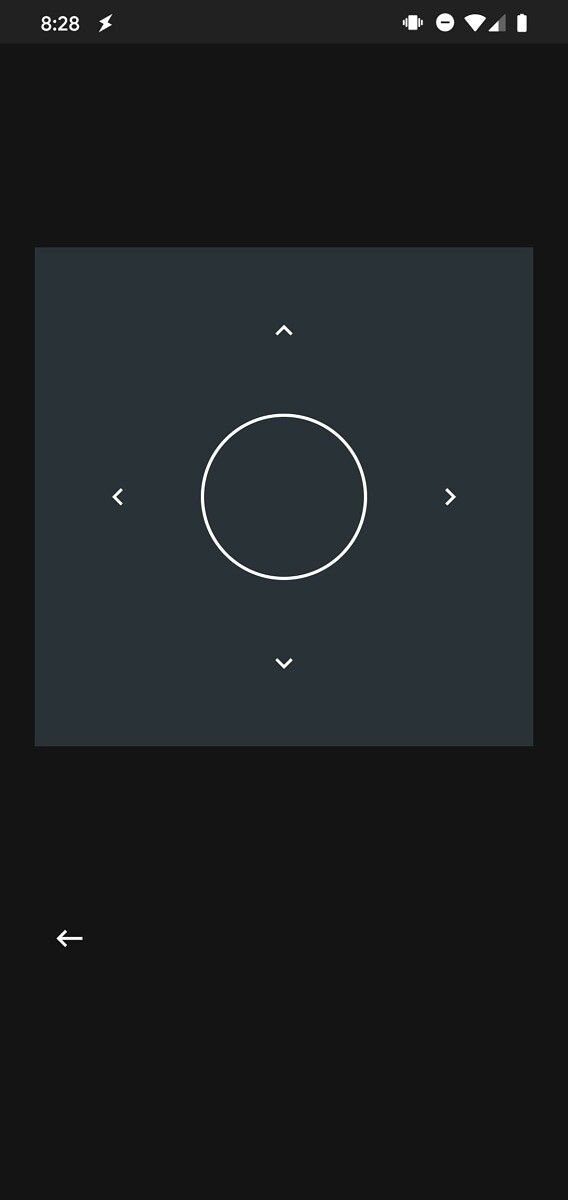
The Google TV app on Android (previously Play Movies & TV) is getting a new remote control feature that will let you control your Android TV. Our Editor-in-Chief, Mishaal Rahman, has spotted the feature in the latest Google TV release (v 4.25) and, while it isn’t live yet, he has managed to enable it manually to get the following screenshots:

Google TV app remote control Google TV app remote control

As you can see in the attached screenshots, the upcoming remote control interface in the Google TV app is quite minimal. It features a large square D-pad with a circular button in the center and arrows on four sides that will help you easily navigate the Android TV UI on your connected smart TV.

To control a TV, you’ll first need to pair the TV to the app by selecting it from a list of available TVs. This will begin a pairing process, in which you’ll have to enter a 4-digit PIN code shown on your TV in the app. Once that’s done, you should be able to use the remote control feature to control your Android TV.

Mishaal tested the feature with a couple of devices, and it currently doesn’t seem to work with NVIDIA’s SHIELD TVs. It’s worth noting that this new remote control feature in the Google TV app will likely replace the Android TV Remote Control app, which hasn’t been updated in years. Therefore, we suspect that it may receive additional capabilities, like voice input support, a touchpad, and keyboard support, before it rolls out to users. But, at the moment, we haven’t seen any evidence in the app to support this claim.

As of now, Google hasn’t shared any official information regarding the feature. We will update this post as soon as the remote control feature starts rolling out to users with a future Google TV update.

The post Google TV app preps a new remote control feature for your Android TV appeared first on xda-developers.


from xda-developers https://ift.tt/2MBjT2G
via IFTTT

OPPO Find X3 leaks leave almost nothing to the imagination

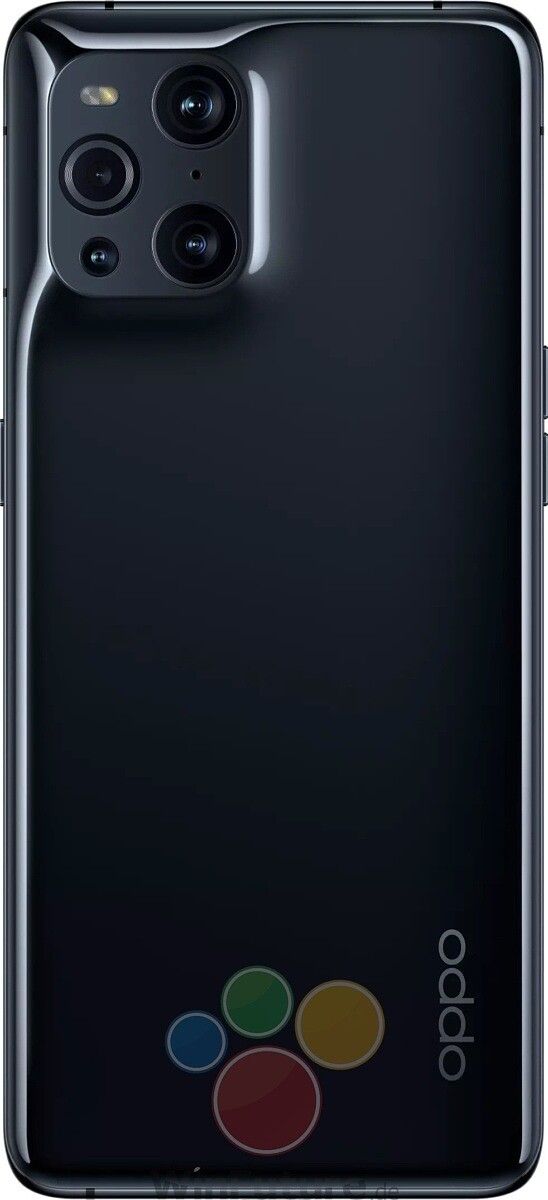
The OPPO Find X3 series is officially launching on March 11, and reports so far suggest there will be at least three devices in the series. The OPPO Find X3 Pro will lead the pack as a proper flagship, while the Find X3 Lite and Find X3 Neo are believed to be premium mid-range offerings. All devices have leaked extensively over the past few months, with leaked renders and specifications giving us a good idea of what to expect from OPPO’s 2021 flagship lineup. But it seems there are still some more leaks left in the tank.

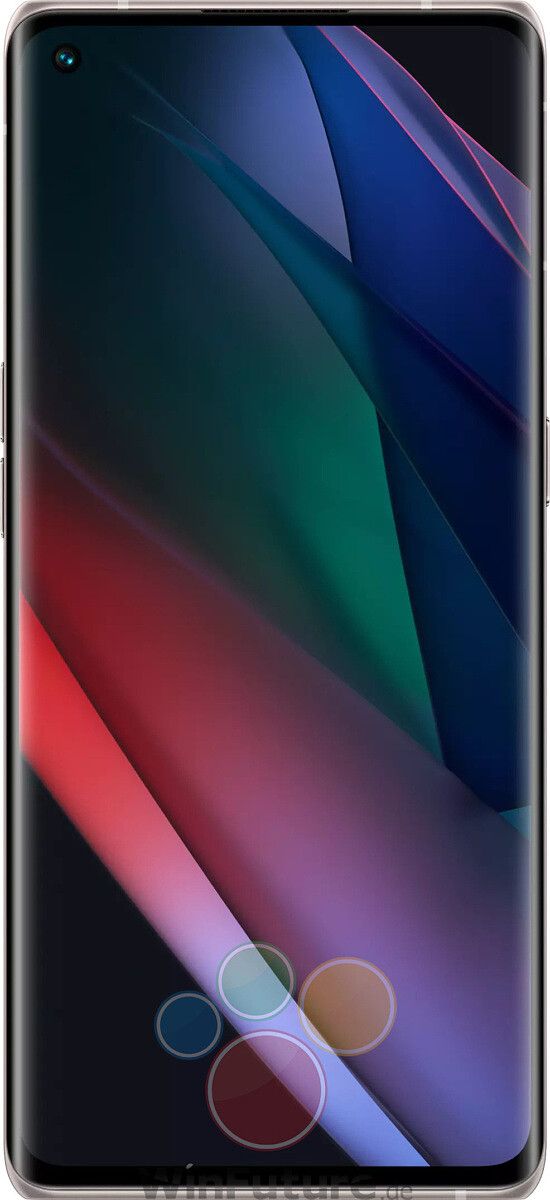
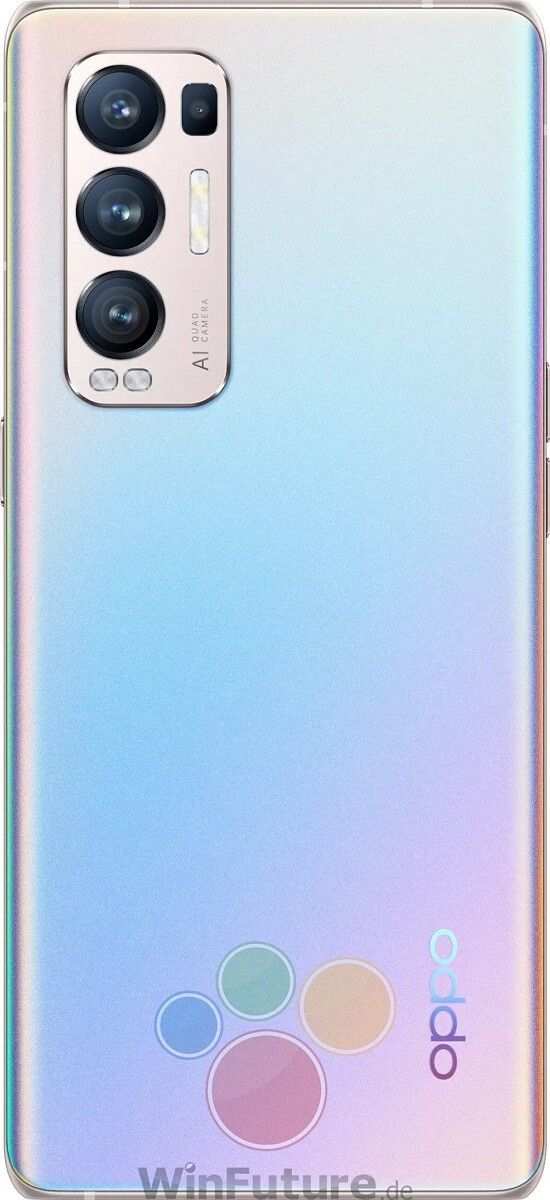
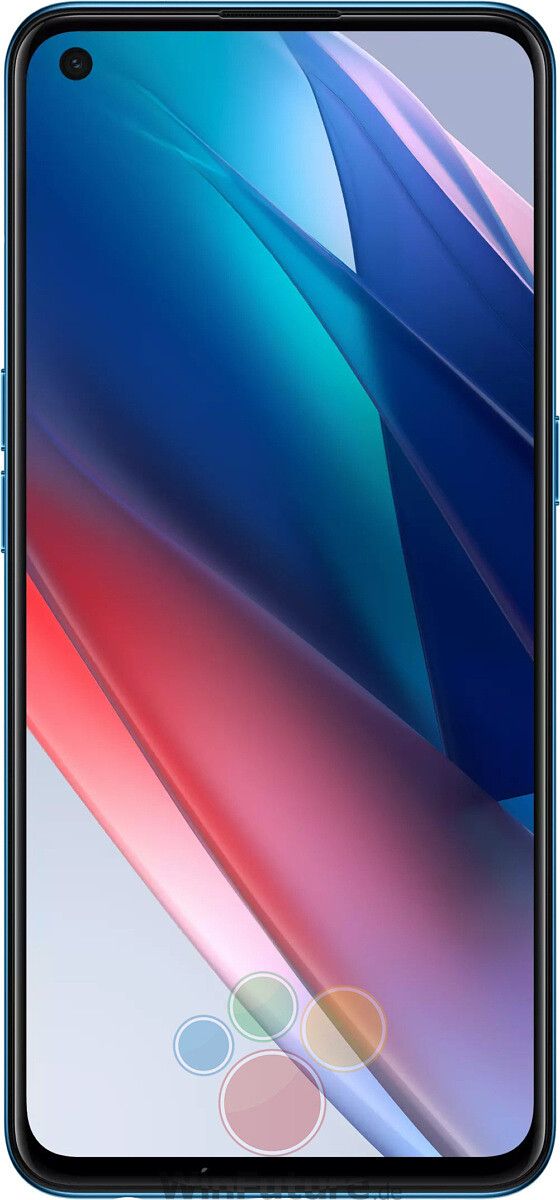
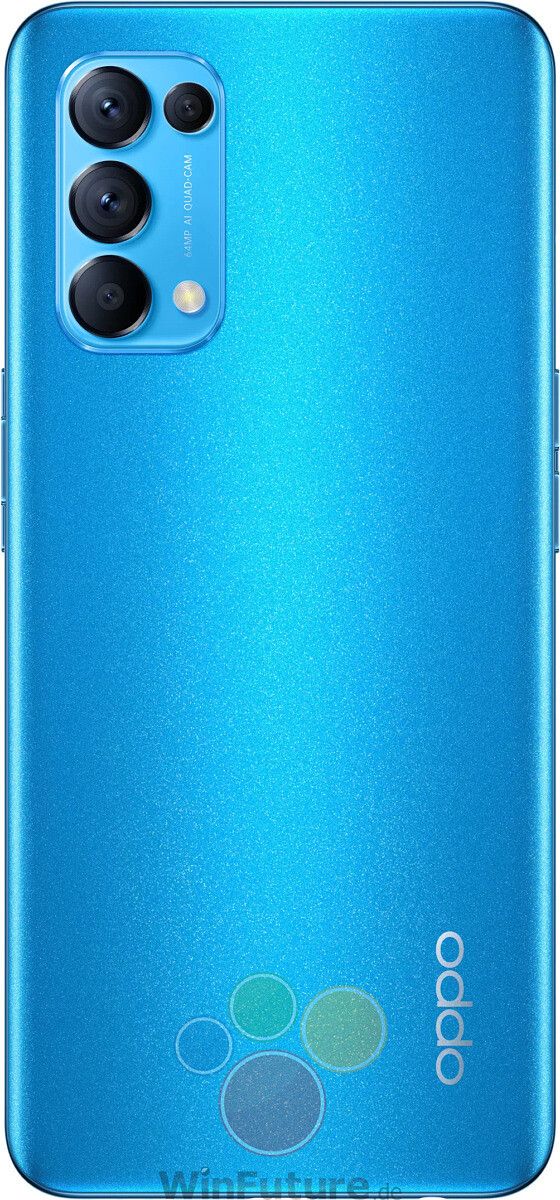
Firstly, WinFuture has obtained what they say are the complete specifications of all three smartphones along with their high-resolution press renders.

OPPO Find X3 Pro

As expected, the OPPO Find X3 Pro will be the most premium of the trio. A direct successor to last year’s Find X2 Pro, the latest flagship smartphone from OPPO will bring substantial upgrades all around, ranging from design and display to processor and camera hardware. Most of the key details about the Find X3 Pro’s hardware have been revealed through previous leaks, but the latest report from WinFuture adds further weight to those leaks.

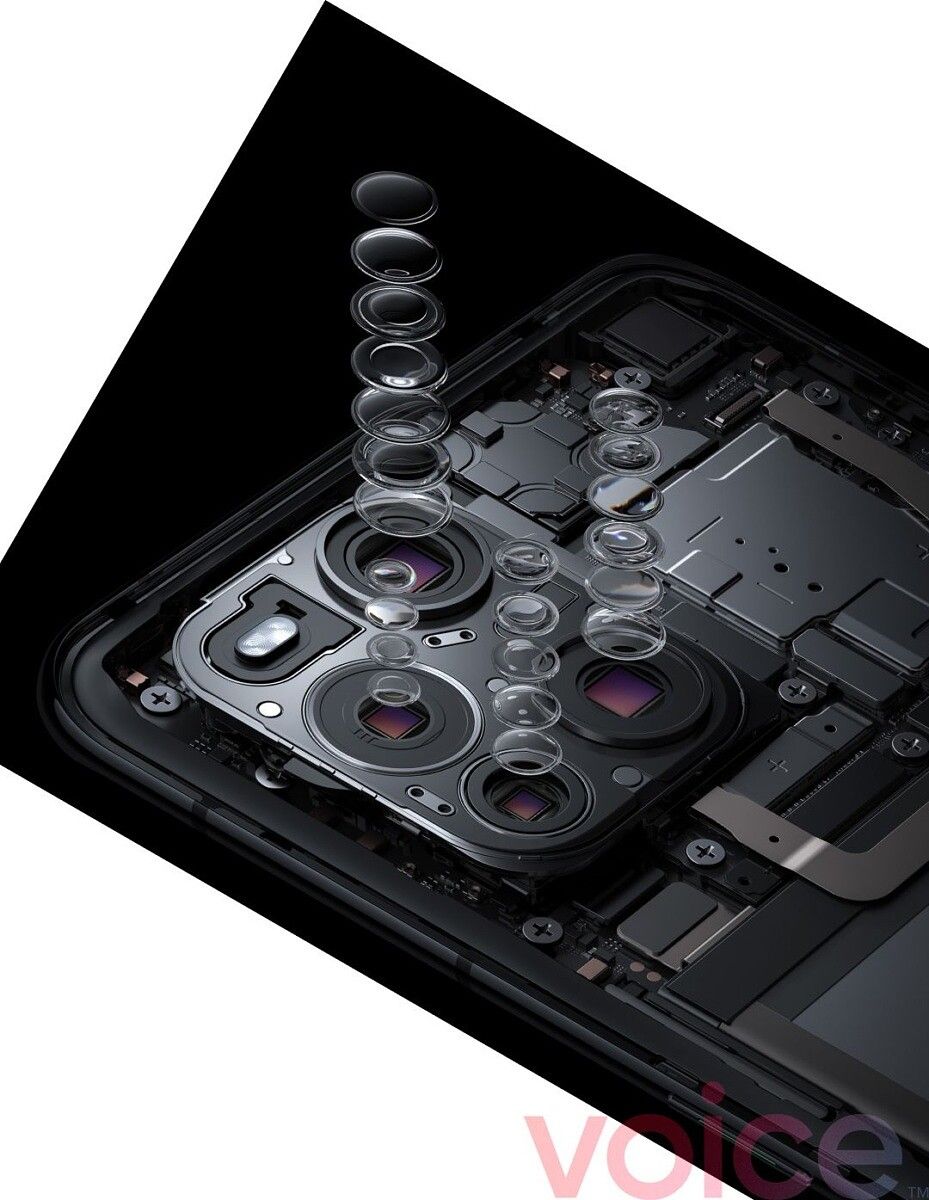
According to the publication, the Find X3 Pro will feature a 6.7-inch QHD+ AMOLED display with a 120Hz display variable refresh rate and HDR10+. The display will be protected by a layer of Gorilla Glass 5, and it will also have a fingerprint scanner underneath. The quad-camera setup will consist of a 50MP f/1.8 Sony IMX766 primary camera with OIS, a 50MP f/2.2 ultra-wide camera, a 13MP periscope camera with 2x zoom, and a 5MP macro lens with up to 25x zoom.

The OPPO Find X3 Pro will come in two colors: Blue and Silver, both of which can be seen in the images linked below.
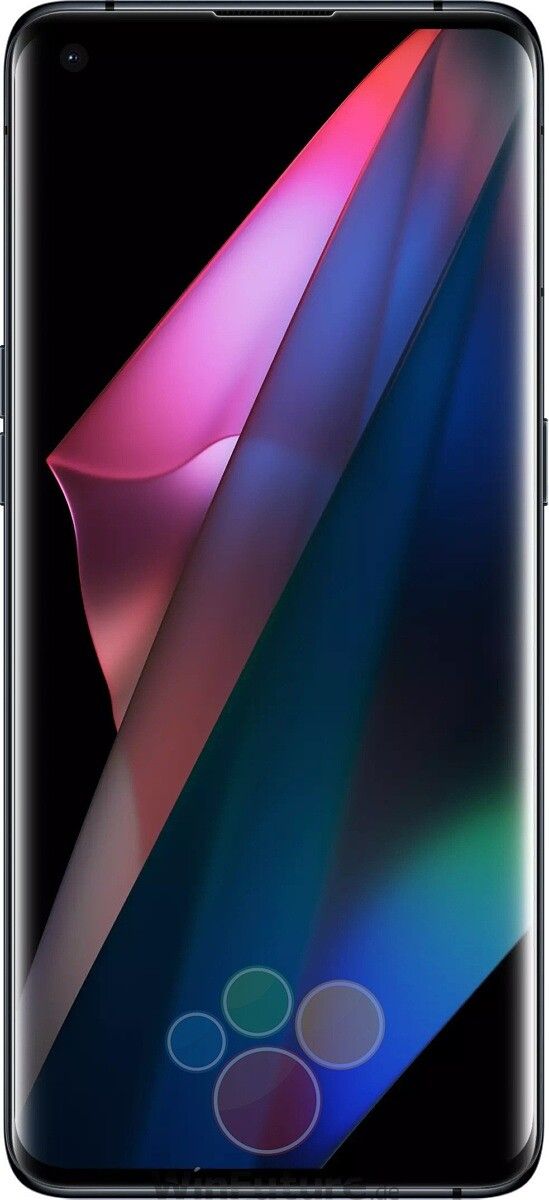
Find X3 Pro - Front Find X3 Pro - Black Find X3 Pro - Blue Find X3 Pro - back Find X3 Pro - bottom

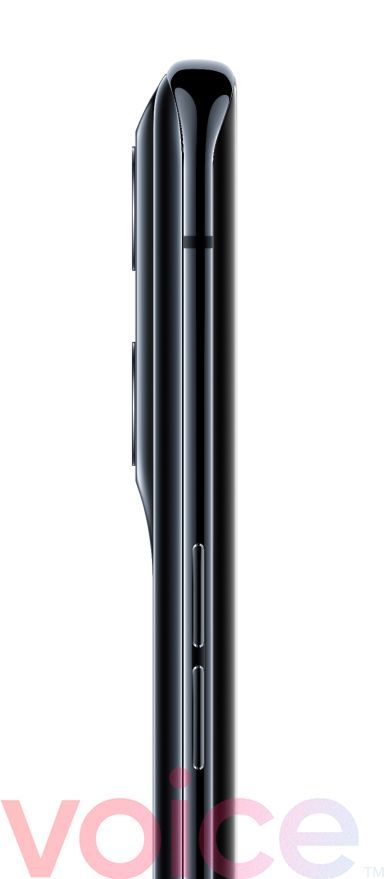
Separately, Evan Blass has also shared high-quality renders of the Find X3 Pro along with a video teaser that gives us our closest look yet at the upcoming flagship.
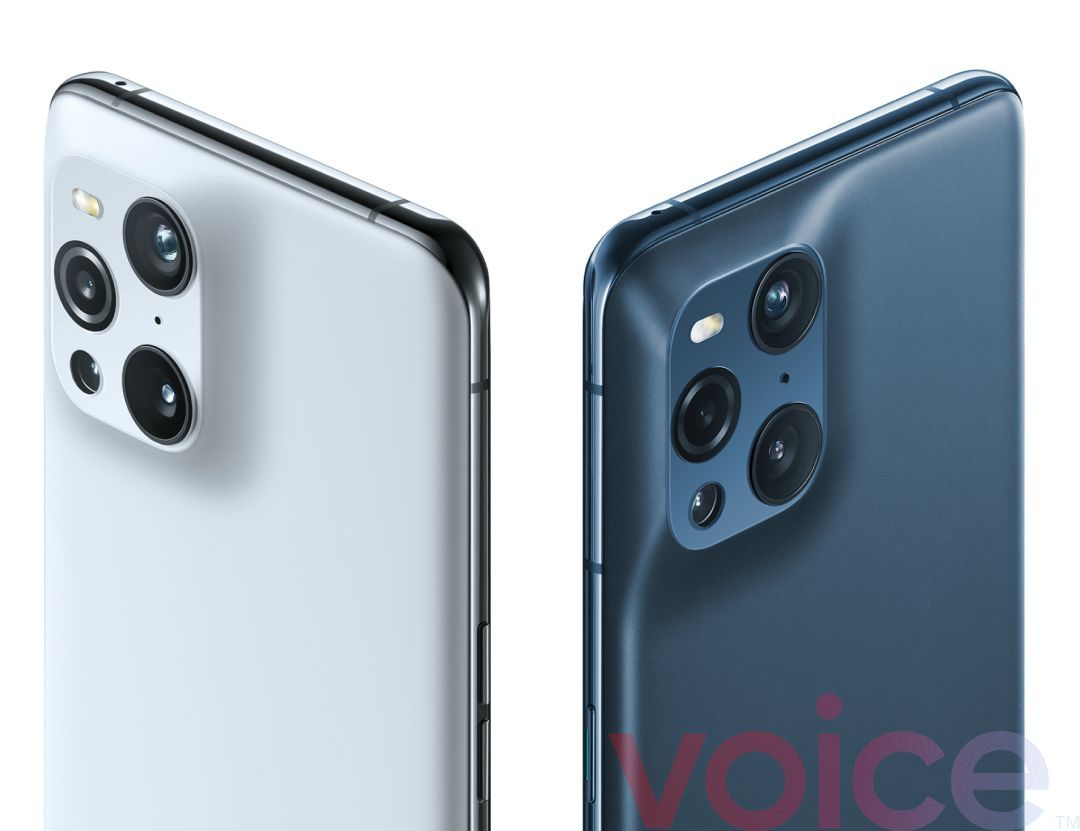
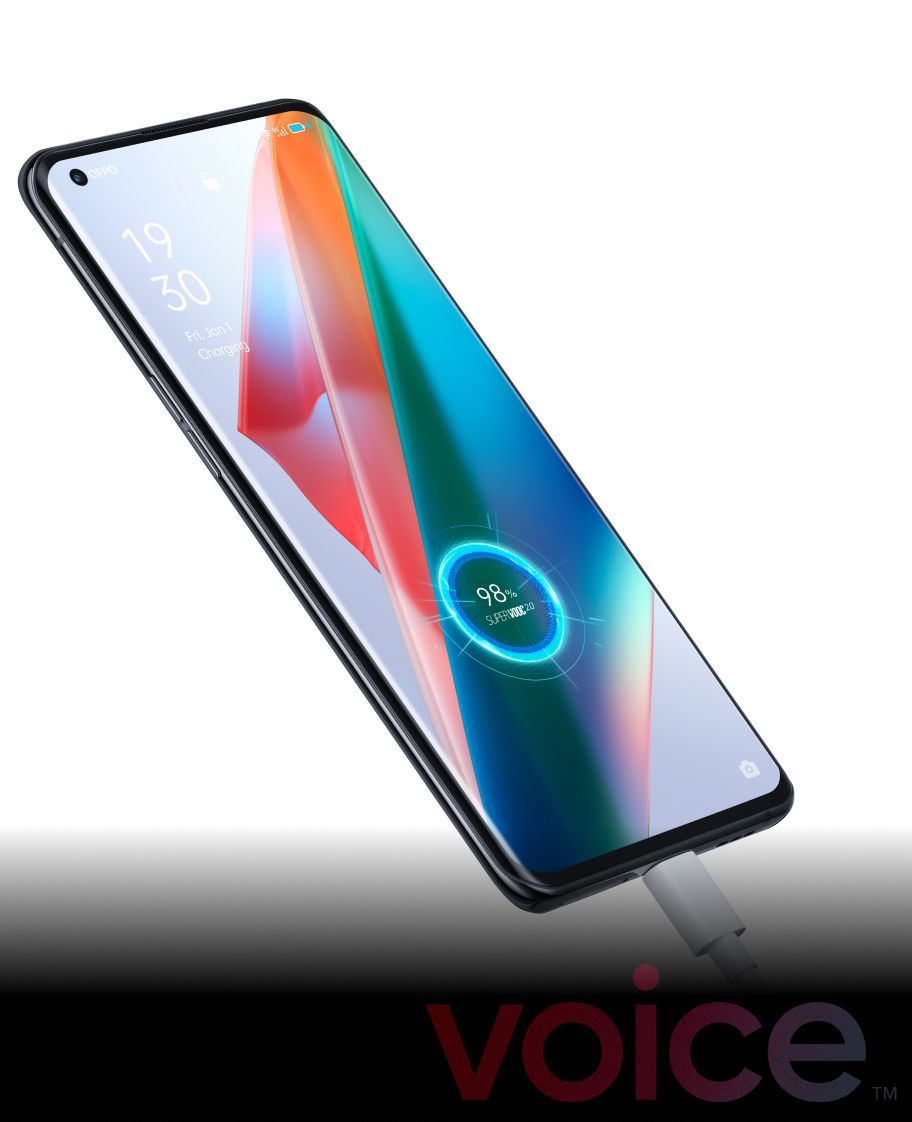
Find X3 Pro Find X3 Pro - Front look Find X3 Pro - camera closeup Find X3 Pro Camera Find X3 Pro - side view

OPPO Find X3 Neo

The OPPO Find X3 Neo is expected to be a premium mid-range smartphone. According to Evan Blass, it will be a rebadged version of the Reno 5 Pro+ 5G with a few hardware changes instead of a brand new device. In terms of specifications, WinFuture says the Find X3 Neo will pack a 6.5-inch full HD+ AMOLED display with a 90Hz screen refresh rate, the Qualcomm Snapdragon 865 SoC, 12GB RAM, a quad-camera setup with a 50MP Sony IMX766 primary sensor, a 4,500mAh dual-cell battery with 65W charging support, and 5G support. Similar to the Find X3 Pro, the Find X3 Neo will also come in Black and Silver colors.

Find X3 Pro Front Find X3 Pro Back Find X3 Neo Side view Find X3 Neo bottom

Oppo Find X3 Lite

Finally, the OPPO Find X3 Lite has also been fully detailed, complete with press renders. As Blass confirmed in January, the device will be a rebadge of the Reno 5 5G. As far as specifications are considered, the Find X3 Lite will come with a 6.44-inch full HD+ AMOLED panel with a 90Hz refresh rate, Qualcomm Snapdragon 765G chipset, 8GB RAM and 128GB storage, a 64MP primary camera, a 32MP front shooter, and a 4,300mAh dual-cell battery with 65W fast charging support. It will be available in three colors: Blue, Black, and Silver.

Find X3 Lite Find X3 Lite Blue


OPPO Find X3 Series Specifications

Specifications Find X3 Pro Find X3 Neo Find X3 Lite
Dimensions and Weight
  • 163.4 x 74 x 8.3 mm
  • 193g
  • 159.3 x 74 x 7.99 mm
  • 184g
  • 159.3 x 74 x 7.9 mm
  • 180g
Display
  • 6.7-inch AMOLED
  • 120Hz variable refresh rate
  • 3216 x 1440 (QHD+)
  • HDR10+
  • Gorilla Glass 5
  • 6.5-inch AMOLED
  • 90Hz refresh rate
  • 2400 x 1080 (full HD+)
  • HDR10+
  • Gorilla Glass 5
  • 6.44-inch AMOLED
  • 90Hz
  • 2400 x 1080 (full HD+)
  • HDR10+
  • Gorilla Glass 3+
SoC
  • Qualcomm Snapdragon 888
  • Qualcomm Snapdragon 865
  • Qualcomm Snapdragon 765G
RAM and Storage
  • 12GB RAM
  • 256GB storage
  • 12GB RAM
  • 256GB storage
  • 8GB RAM
  • 128GB storage
Rear Camera
  • Primary: 50MP f/1.8 Sony IMX766
  • Secondary: 50MP ultra-wide angle, f/2.2
  • Tertiary: 13MP telephoto, f/2.4, 2X zoom
  • Quaternary: 5MP macro, f/3.0, 25X zoom
  • Primary: 50MP f/1.7
  • Secondary: 16MP ultra-wide angle, f/2.2, EIS
  • Tertiary: 13MP telephoto, f/2.4
  • Quaternary: 2MP macro
  • Primary: 64MP f/1.79, EIS
  • Secondary: 8MP ultra-wide angle, f/2.25, EIS
  • Tertiary: 2MP macro
  • Quaternary: 2MP depth
Front Camera
  • 32MP f/2.4
  • 32MP f/2.4
  • 32MP f/2.4
Battery
  • 4,500mAh
  • 65W fast charging
  • Wireless charging
  • 4,500mAh
  • 65W fast charging
  • 4,300mAh
  • 65W fast charging
Connectivity 
  • 5G NR
  • NFC
  • Wi-FI 6
  • Bluetooth 5.2
  • USB Type C
  • 5G NR
  • NFC
  • Wi-FI AC
  • Bluetooth 5.1
  • USB Type C
  • 5G NR
  • NFC
  • Wi-FI AC
  • Bluetooth 5.1
  • USB Type C
Other features
  • 10bit end-to-end color support
  • In-display fingerprint reader
  • Dual SIM + eSIM
  • IP68
  • Face Unlock
  • IPX4
  • In-display fingerprint reader
  • Dual SIM
  • Face Unlock
  • IP54
  • In-display fingerprint reader
  • Dual SIM
  • Face Unlock
Software
  • Android 11 with ColorOS 11.2
  • Android 11 with ColorOS 11.2
  • Android 11 with ColorOS 11.2

Featured image credits: Evan Blass

The post OPPO Find X3 leaks leave almost nothing to the imagination appeared first on xda-developers.


from xda-developers https://ift.tt/3uKuA4a
via IFTTT

Xiaomi finally makes the jump to AMOLED on the Redmi Note series

Xiaomi will launch the much-awaited Redmi Note 10 series in India later this week. Much like the Redmi Note 9 series, the new lineup will include a host of devices, starting from the vanilla Redmi Note 10 and going all the way up to the Redmi Note 10 Pro Max. Over the last few months, we’ve seen several leaks about the upcoming devices, which have given us a good look at their design and specifications. However, Xiaomi hadn’t shared any official information about the devices until today.

Xiaomi India’s Managing Director, Manu Kumar Jain, recently took to Twitter to announce that the Redmi Note series is finally making the jump to AMOLED panels with the upcoming Redmi Note 10 lineup. The tweet states: “Excited to share that #RedmiNote10 series will feature #SuperAMOLED display — 1st TIME EVER ON a #RedmiNote!”

The tweet also includes a short clip that displays results from a Twitter poll that Xiaomi conducted earlier this year. The poll, which has since been pulled, asked users to choose between a 120Hz LCD panel and a standard AMOLED panel. As you’d expect, an overwhelming majority of users picked AMOLED over the high refresh rate LCD panel. Although Xiaomi deleted the poll, it seems like the company has decided to go with popular demand. In the video, the company clarifies that the Redmi Note 10 lineup will feature not just any OLED panel, but a Super AMOLED panel.

As of now, it isn’t clear if any of the devices in the lineup will receive a high refresh rate panel. However, based on previous leaks, we suspect that the top-of-the-line Redmi Note 10 Pro Max may include a 120Hz Super AMOLED panel. If that’s the case, the Redmi Note 10 Pro Max will definitely reign supreme in the budget smartphone space in 2021, at least on the display front.

In case you missed our previous coverage of the Redmi Note 10 lineup, leaks suggest that the Redmi Note 10 Pro will be a 4G device, which will run MIUI 12 out of the box. It will feature a 120Hz panel with MEMC tech and a quad-camera setup on the back with a 64MP primary camera, a wide-angle camera, a macro camera, and a depth sensor. It will pack a large 5,050mAh battery and it will be based on Qualcomm’s SM7150 platform (Snapdragon 732G).

Leaks about the vanilla Redmi Note 10, on the other hand, suggest that it will feature a 6.53-inch FHD+ display, a massive 5,900mAh battery, an unspecified octa-core processor clocked at 2GHz, up to 8GB of RAM, and up to 256GB of storage. It will also include a side-mounted fingerprint scanner, a triple camera setup on the back, a single selfie shooter housed within a waterdrop-style notch, and a 3.5mm headphone jack.

As of now, we have no further information about the other devices in the Redmi Note 10 lineup. But we expect to learn more in just a few days when Xiaomi officially lifts the covers off the lineup.

The post Xiaomi finally makes the jump to AMOLED on the Redmi Note series appeared first on xda-developers.


from xda-developers https://ift.tt/2PtEK9v
via IFTTT

lundi 1 mars 2021

YouTube Music starts testing new Library Tracks playlist

After rolling out a PWA for Chromebooks earlier this month, Google is now testing a new Library Tracks playlist in YouTube Music. The new playlist has started rolling out to a few users, and it gives them easy access to all the songs in their library.

Reddit user u/Iordbrack recently spotted the new Library Tracks playlist in the YouTube Music app on Android. In a post on the matter, they explain that the playlist shows up in the playback history within the app settings after playing any song from the library. As its name suggests, the automatically generated playlist only includes tracks from your library.

YouTube Music Library Tracks

Credits: u/Iordbrack

As you can see in the attached screenshot, the Library Tracks playlist looks like every other playlist in YouTube Music. It shows cover art at the top, right next to the playlist name and the total number of tracks. It includes a download button to help users download all the tracks for offline playback, a shuffle button, and a play button. Beneath the buttons, you can see a download progress bar, followed by a list of all the songs in the playlist.

The post further reveals that although the playlist cannot be viewed directly as it brings up a 404 error, users can download it and view it offline. Unfortunately, the playlist doesn’t seem to include uploaded music from your library, so it may not be a great solution for users who want access to their complete music library in one place. We sincerely hope Google adds uploaded music to the mix by the time the playlist rolls out to more users.

We currently have no further information about the new Library Tracks playlist or when it will roll out to more users. We’ll update this post as soon as we learn more.

The post YouTube Music starts testing new Library Tracks playlist appeared first on xda-developers.


from xda-developers https://ift.tt/3b8tE1Q
via IFTTT